
Screenshots
App details
- Updated
- 2024-08-19T13:30:35.2823185Z
- Requires
- Windows 10 version 17763.0 or higher
- Language
- German
- Developer
- SOMACOS GmbH and Co. KG
- Category
- Mobile
SoftPas in:
This product is also available in the following languages:
About Mandatos G6
Download Mandatos G6 – Committee Management, Digital Collaboration, Secure Document Access
Overview
Mandatos G6 is a specialized mobile application developed by SOMACOS, designed to meet the evolving demands of modern committee operations. Tailored for councils, boards of directors, and supervisory boards, the app streamlines digital collaboration and document management throughout the meeting lifecycle. Its primary purpose is to enhance organizational efficiency, ensure secure data handling, and improve the overall user experience during formal meetings. By centralizing meeting agendas, documents, voting procedures, and communication, Mandatos G6 addresses common challenges such as disorganized workflows, delayed document circulation, and security vulnerabilities in sensitive decision-making environments.
The app targets professionals who manage structured governance processes, including corporate directors, institutional leaders, and administrative coordinators. Real-world use cases include pre-meeting preparation, real-time document review during sessions, and post-meeting follow-up with voting results and action items. In today’s increasingly digital governance landscape, Mandatos G6 plays a pivotal role in modernizing traditional committee practices, reducing reliance on paper-based systems, and enabling seamless remote or hybrid participation. With its focus on security, usability, and workflow optimization, the app positions itself as a valuable tool within the ecosystem of professional productivity and governance technology.
Released on August 19, 2024, Mandatos G6 reflects a growing trend toward digitized governance, offering a structured, secure, and user-centric platform for decision-making bodies. The developer, SOMACOS, appears to focus on enterprise-level solutions, though specific background details were not provided.
Key Features & Functionality
Mandatos G6 delivers a suite of features designed to support the full meeting lifecycle with precision and security.
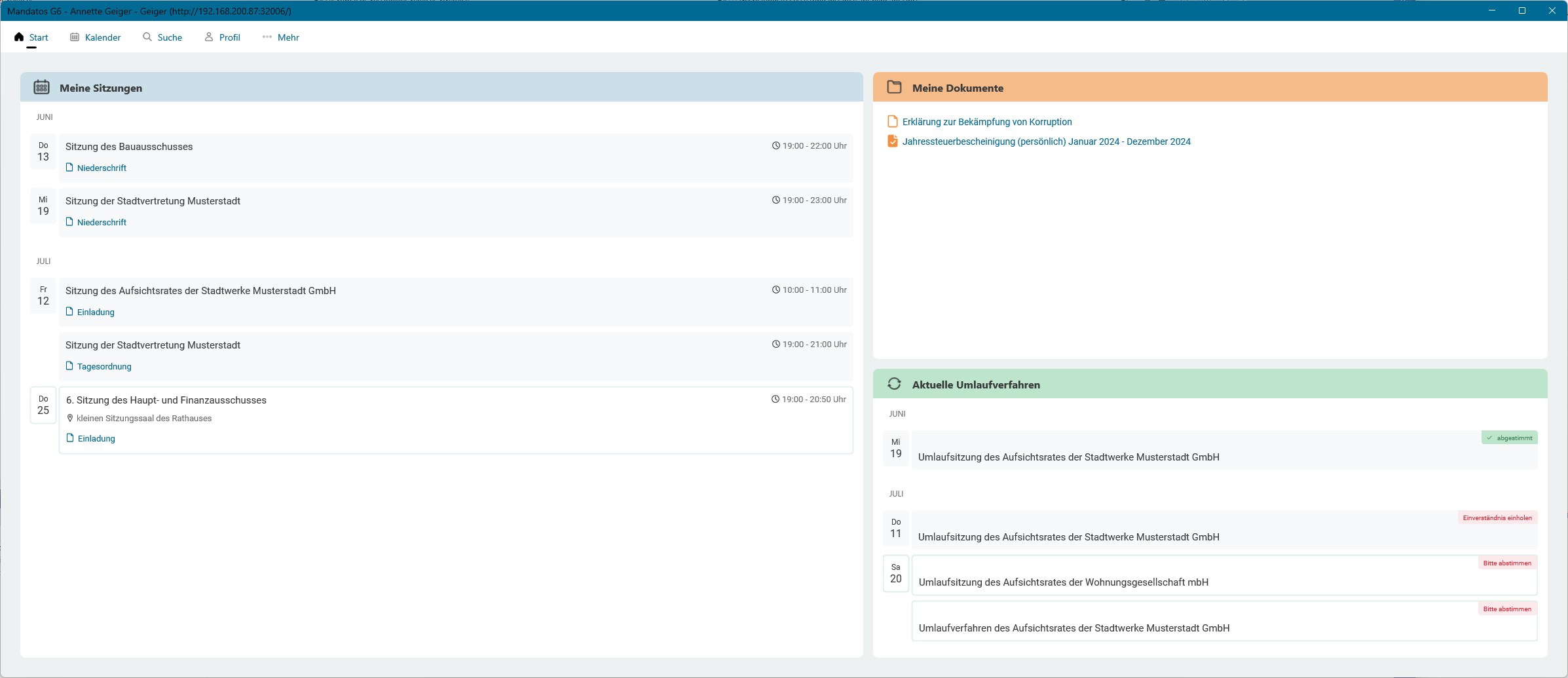
- Modern Responsive Design: The app features a clean, intuitive interface with clear navigation menus, allowing users of varying technical proficiency to access meeting materials quickly. This design reduces cognitive load and supports faster onboarding for new members.
- Enhanced Security Measures: Biometric login and two-factor authentication are integrated to protect sensitive documents and meeting data. These safeguards are essential for environments where confidentiality is paramount, such as board deliberations or regulatory compliance reviews.
- Personalized Meeting Overview: A customizable dashboard provides a real-time view of upcoming and ongoing meetings, document statuses, and circulation progress. Color-coded indicators help users instantly identify documents awaiting review, approval, or action.
- Offline Document Access: Documents are automatically downloaded before scheduled meetings, enabling uninterrupted access even in areas with weak or no internet connectivity. This ensures continuity during travel or in remote locations.
- Integrated Voting Functionality: The app supports secure, transparent voting during both physical and virtual meetings. Members can cast votes directly through the app, with results recorded and shared immediately, improving decision-making speed and accountability.
These features collectively support efficient governance by reducing administrative overhead, minimizing delays, and enhancing transparency. For example, a board member preparing for a quarterly meeting can review all documents offline, participate in real-time voting, and track action items—all within a single, secure environment.
Interface, UX & Performance
Mandatos G6 presents a visually cohesive interface with a focus on clarity and usability. The layout emphasizes hierarchical information flow, placing critical meeting details—such as agendas, deadlines, and document statuses—at the forefront. Navigation is structured around intuitive icons and menu hierarchies, minimizing the need for extensive user training.
The visual style leans toward a professional, minimalist aesthetic, using consistent spacing, typography, and color schemes. This contributes to a polished user experience, particularly important in formal governance settings where credibility and professionalism are essential. The app’s responsiveness ensures smooth transitions between screens and quick loading times for documents and dashboards.
Although the developer did not list formal performance metrics, the app appears optimized for stability across various device categories. Users can expect reliable performance during high-stakes meetings, with minimal lag during document viewing or voting processes. The offline functionality further enhances reliability in unpredictable connectivity scenarios.
Overall, the UX design prioritizes efficiency and accessibility, allowing users to focus on content rather than navigation. The app’s interface is well-suited for both desktop and mobile use, though specific cross-device sync details were not disclosed.
Platform Compatibility & Technical Requirements
Mandatos G6 is available on the Android and iOS platforms, supporting modern operating systems. The app has a file size of 45.2 MB, which is relatively compact for a feature-rich governance tool. It was released on August 19, 2024, and is currently at version 1.0.0.
The developer did not specify minimum OS requirements or device compatibility details. As such, users should ensure their devices meet general system standards for running modern mobile applications. Specific hardware or software prerequisites were not listed.
Pros and Cons
Pros
- Secure biometric login and two-factor authentication for data protection
- Intuitive, responsive design suitable for non-technical users
- Offline access to meeting documents ensures uninterrupted use
- Integrated voting system enhances meeting efficiency and transparency
- Personalized dashboard with color-coded status indicators
Cons
- Specific system requirements were not disclosed by the developer
- Compatibility with older devices or OS versions was not confirmed
- No information provided about cloud backup or data recovery options
- Developer background details were not publicly available
- Updates and feature roadmap were not specified
FAQ
Is Mandatos G6 available for both Android and iOS?
Yes, Mandatos G6 is designed for both Android and iOS platforms, allowing users across different ecosystems to participate in committee work seamlessly.
How secure is the app for handling sensitive meeting data?
Mandatos G6 incorporates biometric login and two-factor authentication to protect user accounts and sensitive documents, ensuring a high level of data security.
Can I access meeting documents without an internet connection?
Yes, the app automatically downloads relevant documents before meetings, enabling full offline access to ensure uninterrupted use in low-connectivity environments.
Is the app free to download and use?
While the app’s price was not specified in the provided information, it is available for download and installation on supported devices.
How often is Mandatos G6 updated?
Specific update frequency was not disclosed by the developer. Users are encouraged to check for updates regularly through their device’s app store.
Final Thoughts
Mandatos G6 stands out as a purpose-built solution for modern governance teams seeking to digitize and secure their meeting processes. With its strong focus on usability, security, and offline functionality, it addresses core pain points in committee operations. The integration of voting, document management, and real-time dashboards creates a cohesive experience that enhances both efficiency and transparency.
While some technical and developer-specific details remain undisclosed, the app’s core functionality is clearly aligned with the needs of professional boards and councils. Its release on August 19, 2024, marks a timely entry into the growing market for digital governance tools.
For organizations committed to modern, secure, and efficient decision-making, Mandatos G6 offers a compelling value proposition. Whether managing quarterly reviews, regulatory compliance, or strategic planning, this app streamlines workflows and empowers teams to act with confidence.
Download Mandatos G6 now
Guides & Tutorials
How to install Mandatos G6
- Click the Download button above.
- Once redirected, accept the terms and click Install.
- Wait for the Mandatos G6 download to finish on your device.
How to use Mandatos G6
This software is primarily used for its core features described above. Open the app after installation to explore its capabilities.
User Reviews
No reviews yet. Be the first to share your experience.
You may also like
more
Que no te pillen¡
About !Que no te pillen¡Reviewed by Jason A. BilbreyShow MoreShow Less

3D Combat Zone
About 3D Combat ZoneOriginally released in 1983, 3D Combat Zone immerses players...

666: El día del portal
About 666: El día del portalOn June 6, 2006, Agent P. Stone uncovers a sinister...

80 in 1 Best Flash games
About 80 in 1 Best Flash games 80 in 1 Best Flash games is a collection of 80 fl...

ABYSS SEEKERーーWhat Do You See Deep in The Abyss
About ABYSS SEEKERーーWhat Do You See Deep in The AbyssIn ABYSS SEEKER, players...

ACA NEOGEO THE KING OF FIGHTERS 2002 for Windows
About ACA NEOGEO THE KING OF FIGHTERS 2002 for WindowsTHE KING OF FIGHTERS 2002,...